 AURA
AURA Declarative, down to the details
Components, anchors, layouts and typed properties. A small language for clearly structured interfaces.
The language ↗Application UI Runtime Architecture
A clear language for your UI. The full control of C++. AURA brings declarative interfaces to a native runtime — from your first widget to a complete kiosk.
Dialog Hello {
    property int count
    size: screen.width, screen.height

    Rect button {
        size: 260, 64
        color: #5947ff
        onTap: { state.count += 1; }
        Text {
            text: "Taps: " + str(count)
            place: center
        }
    }
}
Web demonstration
Interactive web reproduction · Native examples below · Edit AURA live ↗
Layout, interaction and runtime work together. You describe the interface; AURA connects the pieces.
Components, anchors, layouts and typed properties. A small language for clearly structured interfaces.
The language ↗Skia for text, vectors and images. Plus video, Rive animations and optional WebViews.
Graphics & rendering ↗Bindings keep your interface current. Records, lists and states give your data structure.
State & bindings ↗Live preview in VS Code, dynamic loading and window-free PNG rendering.
aura-view ↗Tasks, timers, processes, data formats and devices. C++ building blocks even without graphics.
The application side ↗HTTP and TLS, remote control, and JavaScript and Lua behind one shared API.
Framework overview ↗Linux is the native reference platform. The WebAssembly port brings the shared UI runtime to the browser. The porting status of other systems is documented clearly.
Native reference platform for desktops, touch terminals and kiosks. SDL3 connects available display and input backends.
The real AURA runtime in a canvas: Hello, gallery and editable playground. Operating-system services have specific limits.
Skia packages and graphics build paths exist. A complete platform port with system services and tests is still outstanding.
Screenshots from aura-demo, rendered directly with AURA. Eight pages bring the framework to life.
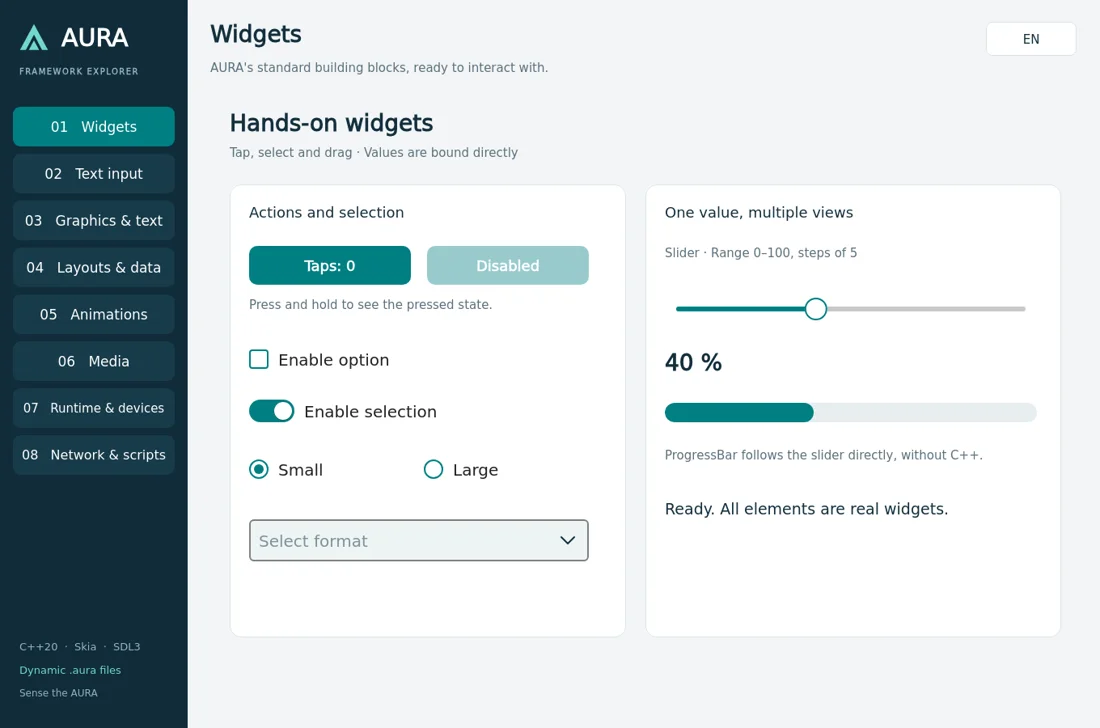
Native AURA demo · Headless renderingExplore the full demo ↗
One .aura file, two execution paths: typed C++ code at build time, dynamic loading during development. Context, state and signals connect them.
Explore the architecture ↗.auraaurac / LoaderC++20Skia / SDL3Skia, SDL3 and other native building blocks power AURA. Explore the selected versions, their licenses and optional modules.
Components, layouts and states in .aura. Readable, typed and close to your interface.
C++ provides data and handles signals. Small UI reactions can use JavaScript or Lua.
Save, inspect the preview and keep working. Generate C++ for the production build.